

Administration, Routing & White-Label Support
Two audiences meet on this page. If you run a support team, this is where you shape the help desk: the categories a ticket can be filed under, the rules that route it, the SLA policies it must honor, the canned responses your agents reuse, and the types, workflows, fields, and labels that give tickets structure. If you build a product on Backbuild, this is also where you turn the help desk into support for your own customers, letting your subscribers file tickets that route to you, under your brand, with each tenant walled off from every other. After this page you will be able to configure the help desk end to end and run white-label multi-tenant support.
Help desk configuration lives in Settings, Administration, Helpdesk, for staff with configuration access. The help desk is included on every plan; unlimited tickets on paid plans. Running support for your own paying customers uses the SaaS Builder, on Pro and above. See the pricing page.
The Setup Surface
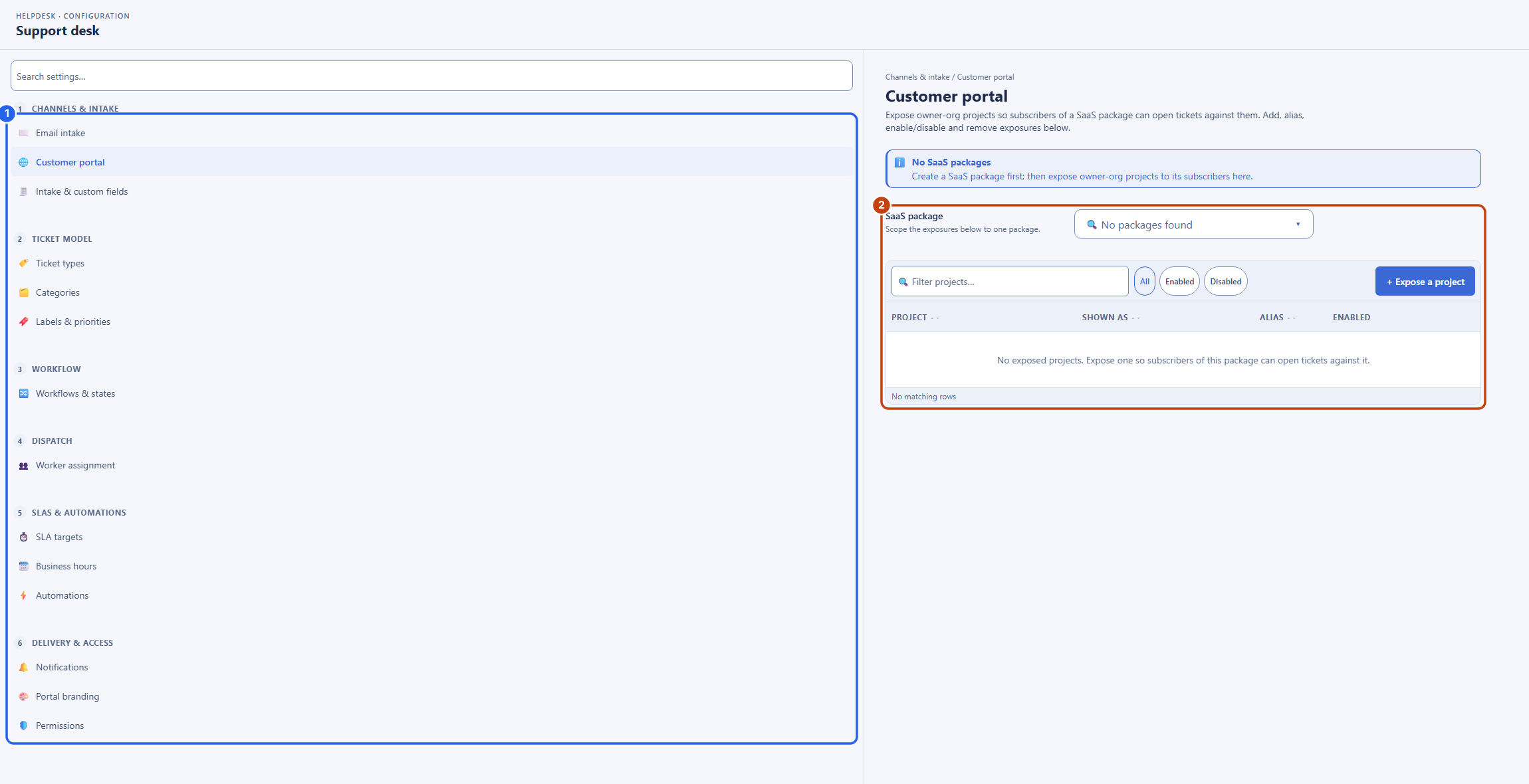
After this section you will know where every setting lives. Open Settings, Administration, Helpdesk. The page lists six numbered groups down the left, and each section opens on the right. Every change commits as you make it, so setup is self-serve and takes effect immediately, with no vendor ticket and no professional-services engagement.
- Channels and intake: Email intake, the inbound addresses whose mail becomes tickets; Customer portal, the projects a subscriber may file against; and Intake and custom fields, the fields collected on a ticket, customer-visible or internal-only.
- Ticket model: Ticket types; Categories, the topics a ticket can be filed under, which can be inherited from a package or a project so the right options appear in context; and Labels and priorities.
- Workflow: Workflows and states, with the transitions and gates covered in Ticket Types, Workflows and SLAs.
- Dispatch: Worker assignment, where you staff each workflow state with a Virtual Worker and a skill, and turn auto-dispatch on or off per state.
- SLAs and automations: SLA targets, Business hours, and Automations, the routing rules that set a default category and priority on intake and can assign the ticket to a person or a virtual worker.
- Delivery and access: Notifications, Portal branding, and Permissions.
Saved replies, the canned responses agents insert from the composer's Insert a saved reply menu, are created and edited through the REST API today.
How Routing Decides Where a Ticket Lands
After this section you will understand why a ticket reaches the right organization. When someone files a ticket, it is routed to the organization responsible for whatever the ticket is about. A ticket carries both the requester's own organization and the package or project it concerns, so the system directs it to the team that owns that surface: a ticket about a Backbuild platform surface routes to Backbuild, and a ticket about a product a builder ships on Backbuild routes to that builder. Your categories and the routing rules under Automations then place it on the right queue inside the receiving organization. Requesters never have to know your internal team structure; they pick a category, and routing does the rest.
White-Label Support for Your Own Customers
After this section you will be able to run support for your subscribers, under your brand. If you package and sell a product on Backbuild, your customers need a way to reach you, not us. The help desk gives you that natively, with no separate support vendor to integrate and no second tool for your team to context-switch into.
- Expose the projects a subscriber can file against. Under Channels and intake, Customer portal, you choose, per package, exactly which of your projects a subscriber may raise a ticket about. Nothing you have not exposed is fileable.
- Control the customer-facing label. Give an exposed project an alias, so it appears to your customer under a name you choose, in your voice, not its internal name.
- Every tenant is isolated. Tickets are scoped strictly per organization. One of your customers can never see another customer's tickets, and your customers never see your internal notes, labels, or fields. The requester surface is walled off from all staff internals.
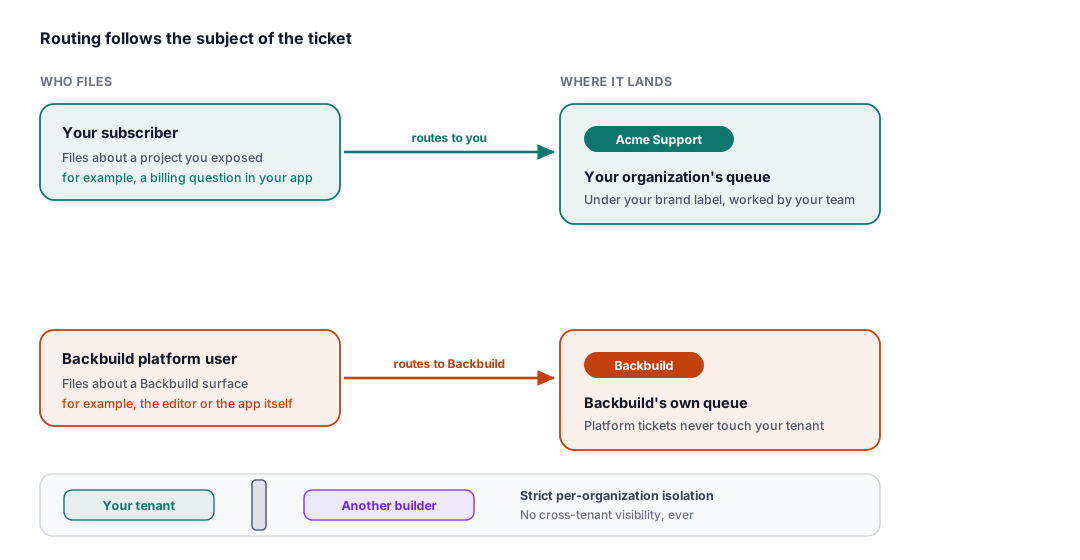
How do my customers file tickets against the products I expose, routed to me? You expose specific projects under Customer portal, and your subscribers file tickets about them. A ticket carries the package or project it concerns, so routing directs it to your organization automatically.
Is tenant data truly isolated? Yes. Tickets are scoped strictly per organization. One customer can never see another's tickets, and no requester ever sees your staff internals. See Security, Privacy and Governance.
Can I brand it and control the label my customer sees? Yes. You set an alias per exposed project, so your customers see your name, not an internal one.
Do I need a separate third-party support vendor? No. The help desk is native to the platform your product already runs on, so there is no extra vendor, no second silo, and no integration to maintain. It is also fully drivable over the API. See The API, MCP and Automation.
Can I build my routing and SLA rules myself, without a vendor ticket? Yes. Categories, routing rules, and SLA targets are configured in your own Helpdesk settings and take effect immediately.
Where to Next
- Ticket Types, Workflows and SLAs: the types, states, and SLA policies you configure here.
- AI Support with Virtual Workers: assign a worker and a skill to a stage or category.
- The API, MCP and Automation: configure and drive the help desk programmatically.
- SaaS Builder: package your product and expose it to subscribers.
- Security, Privacy and Governance: the isolation, roles, and audit trail behind it all.