

Custom Domains
Your product should live on your brand, not a Backbuild URL.
Custom domains let you serve the SaaS package you built from a domain you
own (for example app.acme.com), with a verified DNS
record proving you control it and automatic SSL once it goes live. You can
attach several domains to one package and point a distinct domain at each
environment.
Pro Custom domains are part of the SaaS Builder, included with the Backbuild Pro build-and-ship platform. See pricing.
How custom domains work
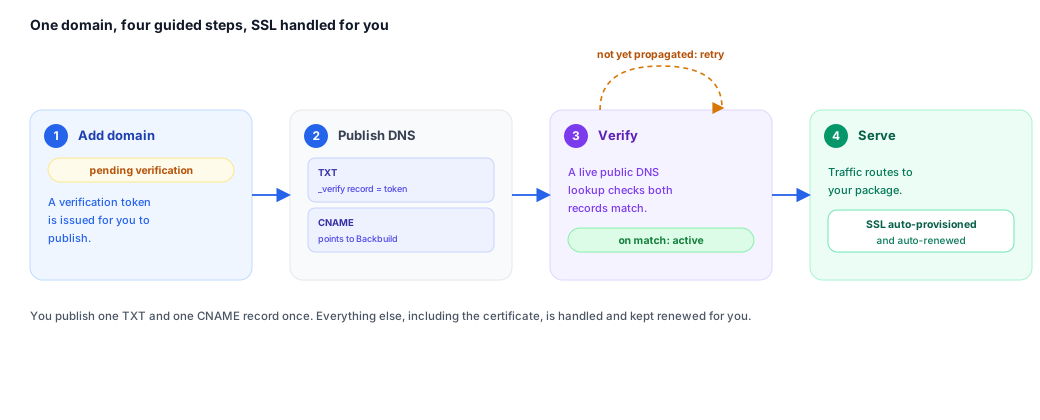
A custom domain is a hostname you register against one of your SaaS packages. Registering it does not make it live immediately. The flow is always the same:
- Add the domain. You register the hostname (e.g.
app.acme.com) against a package. The domain starts in thepending_verificationstate and Backbuild issues a unique verification value for it: a 64-character code that the Custom Domains screen shows under DNS verification, together with the exact record name to publish it at. - Publish DNS. You add a TXT record at
_backbuild-verify.<your-domain>containing the issued token, and point the hostname itself at Backbuild with a CNAME. - Verify. You select Verify (or call the
verify endpoint). Backbuild performs a live public DNS lookup for the TXT
record. If the published value matches the issued value, the domain
transitions to
active. - Serve. Once active, traffic to that hostname is routed to your package and SSL is provisioned automatically. Your tenants reach your product on your domain, and a production domain serves the release you deployed to production (see What a live domain serves).
Verification is deliberately performed against a public resolver rather than on your word: the system relays only what the resolver actually returned, so a domain can never be marked verified unless the matching record is genuinely published. A lookup that fails, returns nothing, or has not yet propagated is treated as a failed verification, never as a success.
You never babysit certificates. The often-hidden cost of running customer domains is TLS: issuing certificates, renewing them before they expire, and firefighting when a renewal fails. On Backbuild that cost is zero for you. Once a domain is verified, its certificate is provisioned and renewed automatically for as long as the domain is active. Your only manual step, ever, is publishing the DNS records once.
Adding a domain
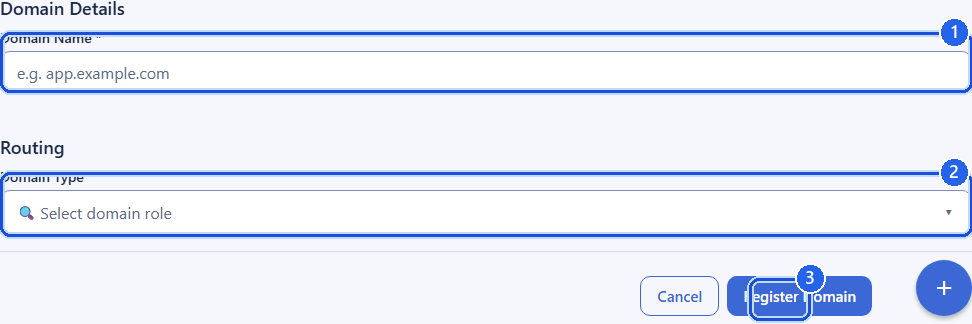
When you add a domain you choose its role on the package and, optionally, the environment and API endpoint it should use. The fields below are the ones you control.
| Field | Type | Description |
|---|---|---|
domain | string | The hostname to register, e.g. app.acme.com. Must be a valid domain name (up to 253 characters). Stored lowercase. Required. |
domain_type | string | The domain’s role: primary, alias, or subdomain. Defaults to alias. |
is_default | boolean | Whether this is the default domain for the package. Defaults to true when domain_type is primary. |
environment | string | Which environment the domain serves: development, staging, preprod, or production. Defaults to production. |
api_base_url | string | Optional. The HTTPS API endpoint the front-end served on this domain should call. Defaults to the Backbuild API base URL for the chosen environment. Must be an https:// URL. |
Adding a domain returns the full domain record, including the verification token you need to publish and the current status. The same hostname cannot be registered twice; attempting to do so returns a conflict.
Domain roles
| Role | Use it for |
|---|---|
primary | The canonical address of your product on this package. Typically also the default. |
alias | An additional hostname that resolves to the same product (e.g. a marketing alias or a legacy domain you are migrating from). |
subdomain | A scoped subdomain you serve under, such as app.acme.com beneath acme.com. |
DNS verification
To prove you control the domain, publish a TXT record at the verification
host. The host is the literal prefix _backbuild-verify. followed
by your domain, and the record value is the 64-character verification value
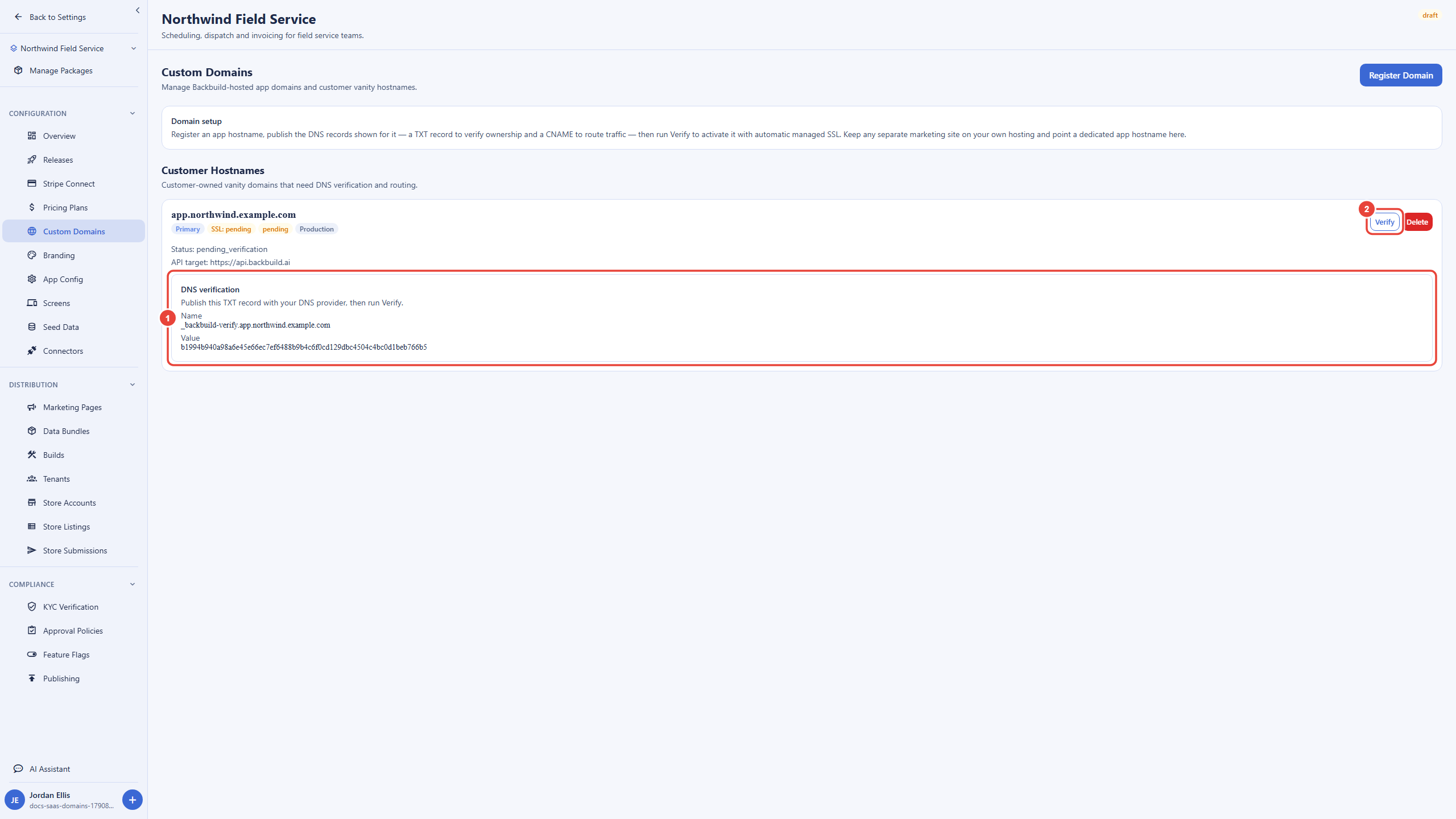
issued for the domain. You never have to work either one out: open
Custom Domains in the package's configuration, and every
domain still awaiting verification shows a DNS verification
panel with the record Name and Value to
copy into your DNS provider. The same value is returned by the API as
dns_verification_token.
# TXT record to publish
_backbuild-verify.app.acme.com.   TXT   "<the 64-character value from the DNS verification panel>"
After the record has propagated, trigger verification (see the API reference
below). Backbuild looks up _backbuild-verify.app.acme.com over
public DNS, finds the TXT record whose value equals the issued value, and, on
a match, moves the domain to active. Only that published record
can verify a domain: holding the value, or having permission to edit the
domain, is not enough on its own. If the record is missing, still
propagating, or does not match, the verify request is refused with
DNS TXT record not found or does not match the expected token and
the domain stays in pending_verification; you can simply retry
once DNS has caught up. A lookup that cannot complete is treated the same
way, so a resolver problem can delay a verification but never grant one. DNS changes can take anywhere from a few minutes to several hours
to propagate depending on your provider’s TTL.
Routing & SSL
To route real traffic, point the hostname at Backbuild with a CNAME record in
addition to the verification TXT record. Once the domain is verified and
active, requests to that hostname are routed to your package and a TLS
certificate is provisioned and renewed automatically, so you do not manage
certificates yourself. The api_base_url you set (or the
environment default) is what the served front-end uses for its API calls, so
the same custom domain can front a development build talking to the
development API and, separately, a production build talking to the production
API.
What a live domain serves
A live domain never shows visitors the configuration you are still editing. What it serves depends on the domain's environment and on whether you ship the package through Releases:
| Domain | What visitors see |
|---|---|
| Production, with an active production deployment | The release deployed to production, for every visitor, signed in or not. A tenant included in an active rollout sees the release that rollout assigns to it. |
| Production, deployed to production before but with nothing active now (for example after an undeploy) | Your product is not served: the domain answers as not deployed until you deploy a release to production again. It never falls back to your working copy. |
| Production, never deployed through Releases | The package's published configuration: its published screens, app configuration and current data bundle. Nothing in draft. |
| Development, staging or pre-production | A preview surface. Members of your organization see the release deployed to that environment; everyone else sees the published configuration, never a non-production release. |
Draft previews of the live working copy are available only to members of your organization; anyone else asking for one is refused. Deploying releases is coming soon, so today a production domain serves the package's published configuration.
Multiple domains and environments
A single package can carry several domains at once. A common setup is one
primary production domain plus one or more aliases, and a separate domain per
non-production environment so your team can preview staging or preprod on a
branded URL. Because each domain declares its own environment and
api_base_url, you control exactly which build and which API each
hostname serves.
Listing domains returns every domain registered to the package; you can filter by status to see only the ones still pending verification or only the active ones. Deleting a domain removes it from the package (soft delete) and stops it serving your product.
Domain status values
| Status | Meaning |
|---|---|
pending_verification | Registered, awaiting a successful DNS TXT verification. |
active | Verified and serving your product, with SSL provisioned. |
suspended | Temporarily not serving traffic. |
deleted | Removed from the package. |
Example: add and verify a domain
POST /v1/saas-packages/{packageId}/domains
Authorization: Bearer <token>
Content-Type: application/json

{
  "domain": "app.acme.com",
  "domain_type": "primary",
  "environment": "production"
}
The response includes the token to publish:
{
  "success": true,
  "data": {
    "id": "019d...",
    "domain": "app.acme.com",
    "domain_type": "primary",
    "status": "pending_verification",
    "dns_verification_token": "3f9c0b6e...e41a",
    "environment": "production"
  }
}
Publish the TXT record, wait for propagation, then verify:
POST /v1/saas-packages/{packageId}/domains/{domainId}/verify
Authorization: Bearer <token>
On a successful lookup the returned record shows status: "active"
and your product begins serving on app.acme.com. If the record
is not published yet, the request answers 400 with the message
above, and you retry later.
API reference
All endpoints require an authenticated session and the relevant custom-domain
permission (organization owners and admins hold these by default). The owning
organization is resolved from your session;
{packageId} is the SaaS package the domain belongs to and
{domainId} is the registered domain.
Package-scoped domains live under the package; an equivalent set of
/v1/org/domains endpoints exists for domains registered to the
organization rather than to a single package. The
/:packageId/custom-domains paths are accepted as aliases of the
/:packageId/domains paths for backward compatibility.
List domains
GET /v1/saas-packages/{packageId}/domainsQuery parameters
| Parameter | Type | Description |
|---|---|---|
status | string | Optional filter: pending_verification, active, suspended, or deleted. |
limit | integer | Page size, from 1 to 200. |
offset | integer | Number of domains to skip. |
Returns the domains registered to the package, with pagination metadata.
Add a domain
POST /v1/saas-packages/{packageId}/domains
Body fields are described in the “Adding a domain” section above.
domain is required; domain_type,
is_default, environment, and
api_base_url are optional. Returns the created domain record
(including dns_verification_token) with
201 Created. Registering an already-registered hostname returns
409 Conflict.
Get a domain
GET /v1/saas-packages/{packageId}/domains/{domainId}Returns the full domain record, including its status and verification token.
Verify a domain
POST /v1/saas-packages/{packageId}/domains/{domainId}/verify
Performs a live public DNS lookup for the TXT record at
_backbuild-verify.<domain> and, on a match with the issued
value, activates the domain. Returns the updated domain record. No request
body is required, and nothing in the request can stand in for the DNS
record.
| Response | When |
|---|---|
200 with the domain record | The TXT record is published and matches; the domain is now active. |
400 VALIDATION_ERROR | The record is missing, not yet propagated, or does not match (DNS TXT record not found or does not match the expected token); the domain is already verified; or the domain was deleted. The domain is unchanged. |
404 NOT_FOUND | No such domain on this package in your organization. |
A missing or not-yet-propagated record is the common case right after you add a domain: wait for DNS to propagate and call verify again.
Delete a domain
DELETE /v1/saas-packages/{packageId}/domains/{domainId}Removes the domain from the package (soft delete) and stops it serving traffic.
Organization-level domains
The same operations are available for domains registered to the organization instead of a single package:
GET    /v1/org/domains
POST   /v1/org/domains
GET    /v1/org/domains/{domainId}
POST   /v1/org/domains/{domainId}/verify
DELETE /v1/org/domains/{domainId}
These accept the same fields and follow the identical add → publish DNS → verify → serve flow described above. In the app, the organization's Settings → Domains page shows the same DNS verification panel, with the record Name and Value, for every organization domain awaiting verification.
Frequently asked questions
- Is SSL automatic, or do I have to manage certificates?
- Automatic. Once a domain is verified, its TLS certificate is provisioned and renewed for you. There is nothing to install, rotate, or monitor.
- What do I actually have to do myself?
- One DNS step: publish the verification TXT record and point the hostname at Backbuild with a CNAME. After that, verify, and the domain goes live. No further manual work.
- Verification failed. Did I do something wrong?
- Usually not. A missing, mismatched, or not-yet-propagated record leaves the domain in pending, and you simply retry once DNS has caught up. Propagation can take from a few minutes to several hours depending on your provider’s TTL. Check that the record is a TXT record at the exact Name shown in the DNS verification panel, holding the exact Value, with no extra spaces.
- Can someone else claim my domain in their own Backbuild organization?
- Not without control of its DNS. A domain becomes active only when the verification record is actually published at your domain, so registering your hostname elsewhere leaves it pending.
- Will visitors see changes I have not shipped yet?
- No. A production domain serves the release you deployed to production, and draft changes are visible only to members of your organization. See What a live domain serves.
- Can my customers reach my product on my domain, not a Backbuild URL?
- Yes. Once active, traffic to your hostname is routed to your package and served under your brand. Backbuild’s URL does not appear.
- Can I use a different domain for staging and production?
- Yes. Each domain declares its own environment and API endpoint, so you can preview staging or preprod on a branded URL separate from your production domain.
Related
- Marketing Pages: build the landing pages your domain serves
- Branding & Themes: the brand your domain serves under
- SaaS Packages: the product a domain points at
- SaaS Builder overview