

Calendar Sync with Google, Microsoft 365, and Apple
This guide is for anyone who already lives in another calendar and wants to know whether Backbuild Calendar can stay in step with it. The short answer today is no: sync with Google Calendar, Microsoft 365, and Apple or CalDAV calendars is not available yet. After this page you will know what you will see in Calendar settings, why you should not rely on it yet, and how to run Backbuild Calendar alongside the calendar you already use.
Sync is not available yet. No events move between Backbuild Calendar and a Google, Microsoft 365, Apple, or CalDAV calendar today, in either direction.
What You Will See in Calendar Settings
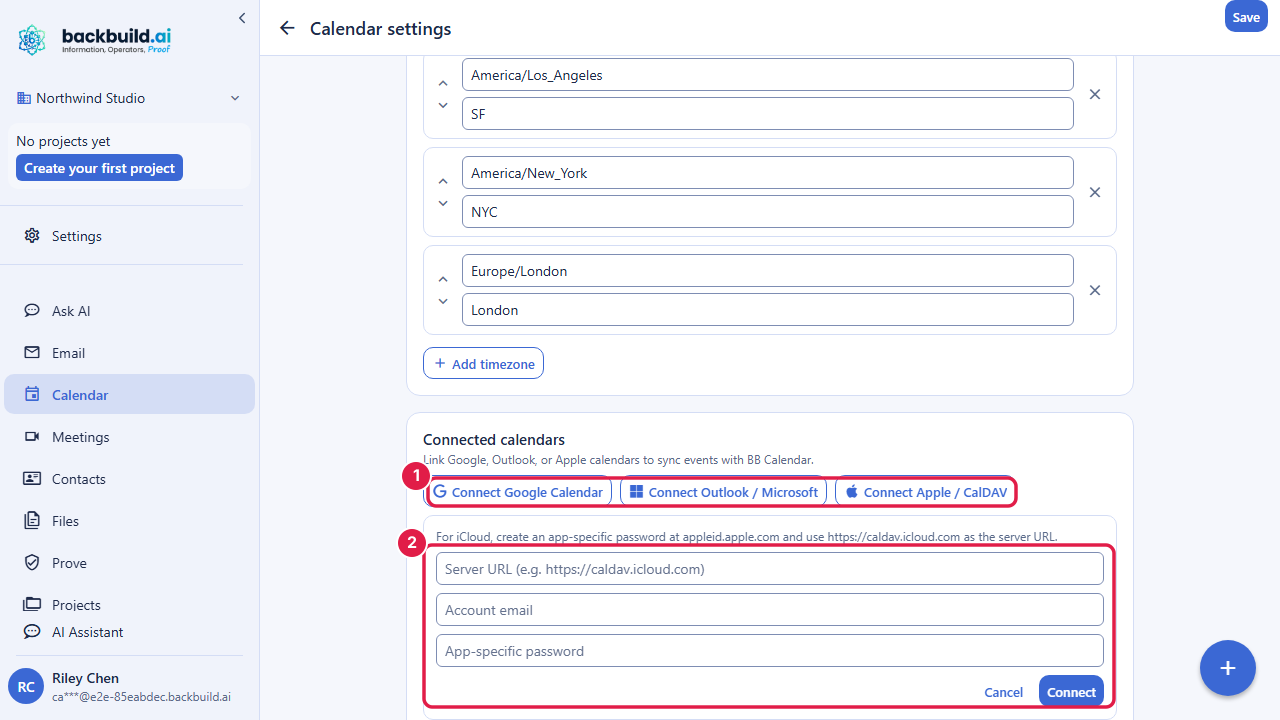
After this section you will recognize the panel and know not to depend on it. Calendar settings, opened from the gear in the top bar, includes a Connected calendars panel with buttons to connect Google Calendar, Outlook or Microsoft, and Apple or CalDAV. The panel is there, but sync is not switched on, so connecting an account does not bring its events into Backbuild Calendar or send yours out. Leave it unused until sync is available.
Working Alongside Your Existing Calendar
After this section you will run both calendars without losing an event. Until sync is available, keep each calendar for what it does best:
- Keep receiving invitations where they arrive. Invitations your colleagues send to your existing calendar stay there; nothing is lost by trying Backbuild Calendar.
- Invitations you send land anywhere. When you create an event in Backbuild Calendar with a Backbuild meeting and guests, each guest is emailed a standards-based invitation with a calendar attachment, so it lands in Google Calendar, Outlook, Apple Calendar, or any other calendar they use. See Inviting Guests.
- Move events by script if you need to. The Backbuild REST API reads and writes events, so a script can copy events between Backbuild Calendar and another calendar's own API. See the API reference.
Will this sync with my phone and my existing Google or Apple calendar, two-way? Not yet. Sync with Google Calendar, Microsoft 365, and Apple or CalDAV calendars is not available, so today you use Backbuild Calendar in the Backbuild web app and the Windows and macOS desktop app.
Can I import my existing calendar? Not in the app yet: there is no import screen and sync is not available. A script can copy events in through the REST API.
Can I get my data back out if I leave? Yes. The whole calendar is readable through the Backbuild REST API, so your events are never trapped. See the API reference.
Related Guides
- Backbuild Calendar: what the calendar does today, and what it does not do yet.
- Recurring Events, Guests, and Reminders: invite guests and know what they receive.
- Settings and Time Zones: the other Calendar settings.