

AI Agents, the API, and Governance
Everything you can do in Studio by hand, you can also do from an AI agent or over the public REST API. That is what makes Studio fit a launch-day pipeline: a production can be created, scripted, and rendered programmatically, and the render returns a cost estimate before it spends. This guide teaches what an agent can build, how the API surface is shaped, how a credential is injected without ever being exposed, and how access, audit, and third-party processing are governed. After it a developer advocate will know how to script a render, and an administrator will know exactly what is enforced.
What an AI Agent Can Build
After this section you will know how far the agent surface reaches. An AI agent can author and generate a production end to end: create it, set the narration script, define the actions, scenes, music, sound effects, and overlays, fill in the metadata and contributors, attach media, import a shape, and start the render, then check status and read the result. The AI generators inside the editors, the image generator for a storybook or a video, the music generator, auto-markup for a script, and text-to-speech drafting, are part of the same agent-driven authoring, so an agent can take a production from an idea to a rendered file. An agent acts through the same access checks a person passes; it cannot do anything the acting identity is not allowed to do.
Driving Studio Over the API and Native Tools
After this section you will script a render into your own pipeline. The whole Studio surface is available two ways: as native agent tools an AI assistant calls, and as project-scoped endpoints on the public REST API for productions, script, actions, scenes, music, sound effects, overlays, metadata, contributors, encoding, media, voices, shapes, and the render itself. Because a render returns a credit estimate before it runs, a launch-day automation can create a video from a script, see what it will cost, and produce it repeatably, which is the CI-style repeatability a demo team wants. See the REST API reference for the endpoints and the MCP and agent integration guide for the tool surface.
A production is created as a draft. Before you start its render, set its status to ready and, for a training video, set the site it records, which must be on your organization's Recording sites list (below). The editor's own render controls do not start a render for a draft yet, so this API or agent step is how a render starts today.
Can I trigger renders programmatically, CI-style, for a launch? Yes. Create and script a production and start its render over the public REST API or from an AI agent, and the render returns a credit estimate before it spends, so a repeatable launch-day pipeline is predictable rather than a surprise bill.
Can an agent build a whole video, or only tweak one? An agent can go end to end: create the production, write the script, define the actions and layers, set metadata, and render, all within the acting identity's permissions.
Injecting a Credential Without Exposing It
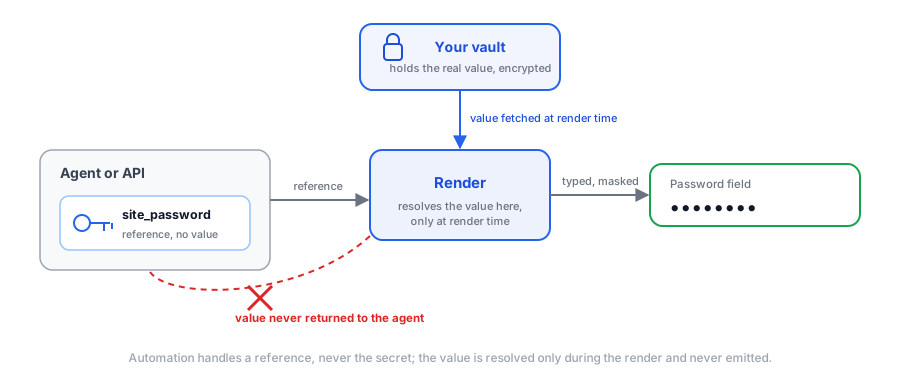
After this section you will automate a signed-in demo safely. When a training video needs to record a screen behind a login, the production references an item in your Secrets vault rather than a typed-in value. The agent and the API deal only in the reference, never the secret itself: the value is not returned to a caller, not placed in a link, and not shown in the editor. It is resolved only at the moment the render needs it, typed into the marked field with the input hidden and the field masked, and used only on the production's own site. A credential you link is never emitted back through any tool or endpoint. Linking a credential to a production is rolling out; until it is enabled for your workspace, a request to link one is refused, so automate walkthroughs that do not need a sign-in.
Approving the Sites a Recording May Open
After this section an administrator will know what a screen
recording can reach. A training video drives a real browser against
one site, so that site is confined to a list the organization controls:
Studio, Recording sites. Backbuild's own sites are always on it. Only an
owner or admin of the organization can add or remove entries; everyone else
sees the list read-only. An entry is a public hostname, which matches exactly
that host, or a wildcard such as *.example.com, which matches
every host below it but not the name itself. IP addresses, ports, paths, and
private names are refused, a list holds up to 100 entries, and every addition
and removal is audited.
The rule is enforced on the server, not in a screen, so an agent, an API call, or a tampered request is held to it exactly as a person is. A production naming a site that is not on the list cannot be saved; the list is checked again when a render is started and again when it begins, so a site removed later takes effect for every render that has not started. During the render the browser cannot leave the production's site: a navigation, a redirect, or a pop-up to another site ends the render. The same list is available over the REST API, to read, add to, and remove from (see the Studio API reference), and the step-by-step screen is described in Making a Training Video.
Access, Roles, and Audit
After this section an administrator will know what is enforced. Productions live inside a project, so who can see and change one follows the project's access and the member's role, the same model as the rest of your workspace. Every change to a production is authorized against the acting identity's membership and role and their access to the project, and every write is recorded in the audit trail with who did it and when. This holds whether the actor is a person in the editor, an AI agent, or an API call: the checks are on the operation, not on the doorway it came through, so an agent or a script has exactly the reach of the identity behind it and no more.
Governing Which Provider Voices Your Narration
After this section you will know how speech processing is governed. Turning a script into speech and aligning the words is performed by a speech provider, which means the text you narrate is sent to that provider to be voiced and timed. Two controls put which provider handles it in an administrator's hands. First, bring your own key: supply your organization's own provider key, held in the encrypted Secrets vault, and voicing and alignment run on your own provider account and contract rather than a shared default, metered at zero credits by Backbuild. Second, a connection policy: an administrator can require Studio to use an organization-approved speech connection for everyone, instead of letting each person pick, so narration always runs through the provider your organization has vetted. Together these let a compliance-minded team decide exactly which provider processes its narration before rolling Studio out.
Where does my narration text go when it is voiced? Producing speech and aligning it is performed by a speech provider, so the narration text is sent to that provider to be voiced and timed. Bring your organization's own provider key and that processing runs on your own provider account; an administrator can also require Studio to use an organization-approved speech connection for everyone, so you control which provider handles it.
Can an agent or API key see a secret I linked to a production? No. Automation only ever handles a reference to the vault item. The value is not returned by any tool or endpoint and is resolved only during the render, typed in masked and used only on the production's own site.
Can an agent or a script record a site we have not approved? No. The site a training video records must be on the organization's Recording sites list, which only an owner or admin can change, and the check runs on the server when the production is saved, when its render is started, and when the render begins.
Is every change attributable for an audit? Yes. Every write to a production is authorized against the actor's role and project access and recorded in the audit trail with who and when, whether the actor is a person, an agent, or an API call.
Where to Go Next
- REST API reference: the endpoints for productions, script, actions, media, voices, and rendering.
- MCP and agent integration: connect an AI agent to your workspace.
- Making a Training Video: the flagship module an agent most often drives.