

Release Management
Release management is how you freeze the SaaS package you built (its screens, entities, workflows, pricing, roles, and AI skills) into versioned releases you can inspect and discuss. Every release is a complete, hash-verified snapshot of the package. Today you cut releases, compare any two of them, see exactly what each one pins, review them in a typed conversation trail, and run the release compliance check. Approving a release, deploying it, staged rollout, and rollback are not available yet; the last section of this page describes how they will work.
Pro Release management is part of the Backbuild Pro build-and-ship platform, alongside the SaaS Builder and the SaaS marketplace. See pricing.
What a Release Is, and What It Captures
After this section you will know exactly what gets frozen into a release, and what does not, so what you review is exactly what the release holds. A release is a versioned snapshot that captures the full state of a SaaS package at a single moment. When you create one, the system freezes the current configuration into an immutable record, computes a SHA-256 hash over its contents, and assigns it a version number automatically. From then on that snapshot never changes: it is the unit you review today, and the unit you will approve, deploy, and roll back once those steps are available.
The number-one worry builders bring to releases is that the snapshot quietly leaves something out, so what ships differs from what they tested. It does not. A snapshot captures every configurable part of the package:
| Component | What is captured |
|---|---|
| Package metadata | Name, description, version, owner. |
| Pricing plans | All pricing tiers, billing intervals, and amounts. |
| Screen definitions | UI screen layouts and component configurations. |
| Seed data | Default data loaded for new tenants. |
| Entity types | Custom entity type schemas and field definitions. |
| Workflows | Workflow definitions, triggers, and automation rules. |
| AI skills | Custom AI skill configurations and prompts. |
| Views | Saved filter and sort configurations. |
| Roles & permissions | Custom roles and permission mappings. |
| Connector configs | Third-party integration configurations. |
| App configs | Application-level settings and feature toggles. |
| Data bundles | Static data packages and asset references. |
What a release does not contain: your customers' live tenant data. A release is the configuration of the product, not the records your tenants create inside it.
Cut Your First Release
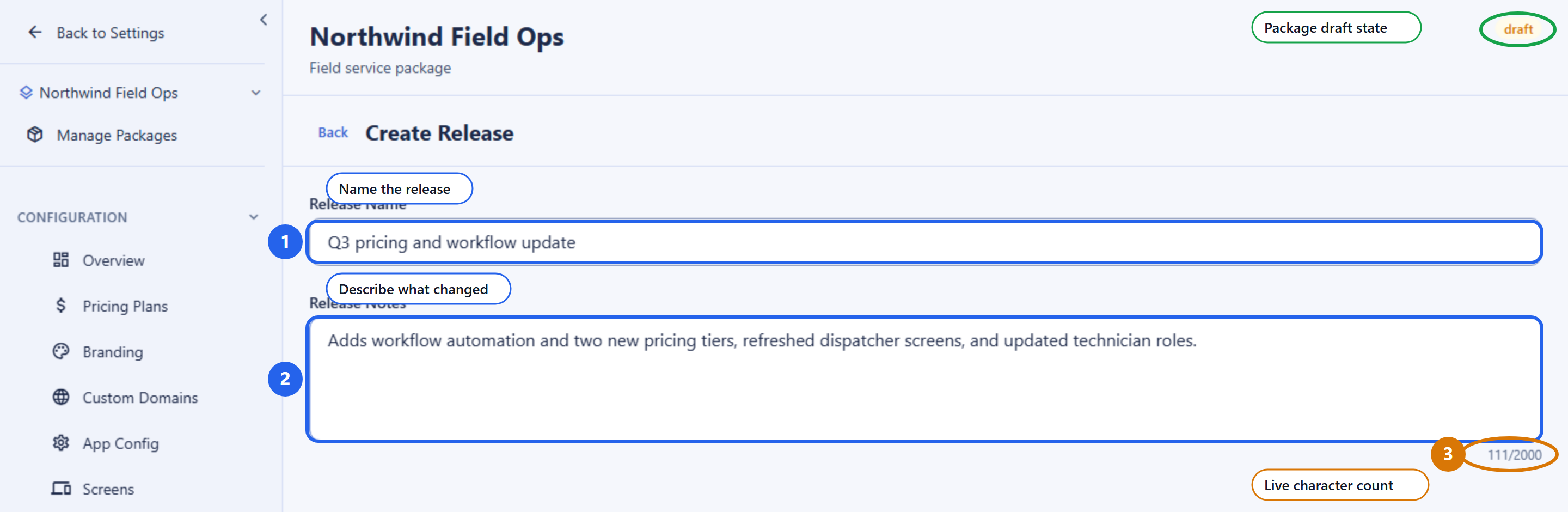
After this section you will be able to turn your current working package into a versioned release. Creating a release takes two pieces of information: a name and, optionally, notes. Everything else, the snapshot contents, the hash, and the version number, is captured for you.
| Field | Required | Meaning |
|---|---|---|
release_name | Yes | A human label for this release, 1 to 200 characters. |
release_notes | No | Free-form notes, up to 10,000 characters, describing what changed. |
You do not supply a version number. The system assigns the next integer
version automatically (one higher than the previous release of this package),
so versions are always sequential and never collide. The new release starts
in draft status.
POST /v1/saas-packages/019d.../releases
Authorization: Bearer $TOKEN
Content-Type: application/json

{
  "release_name": "Q3 pricing and workflow update",
  "release_notes": "Adds workflow automation and two new pricing tiers."
}

# Response
{
  "id": "019e...",
  "version": 7,
  "release_name": "Q3 pricing and workflow update",
  "release_notes": "Adds workflow automation and two new pricing tiers.",
  "snapshot_hash": "sha256:a1b2c3...",
  "status": "draft",
  "created_by": "019d...",
  "created_at": "2026-07-16T10:00:00Z"
}
The response returns the release metadata, not the full snapshot. The
version is an integer, and the snapshot_hash is the
fingerprint that lets anyone confirm later that the snapshot has not changed.
Compare Versions and Pin Every Resource
After this section you will be able to see exactly what changed between two releases, resource by resource. Before you ship, you want a readable answer to “what actually changed since last time?” The diff view compares two release snapshots and reports what was added, changed, and removed across the package.
GET /v1/saas-packages/019d.../releases/diff?from=019e...&to=019f...
Authorization: Bearer $TOKEN
Every release also records a version-pinned manifest: each captured resource (each screen, entity type, workflow, pricing plan, and so on) is stored with the exact version it had at snapshot time. You can list those pinned items to see, resource by resource, precisely what this release contains.
GET /v1/saas-packages/019d.../releases/019e.../items
Authorization: Bearer $TOKEN
The pinned manifest and the snapshot hash together let anyone confirm, later, exactly what a release contained.
The Release Lifecycle
After this section you will know which statuses you can set on a release today. A release has a status that records where it stands.
| Status | Meaning | Available today |
|---|---|---|
draft | Just created. The snapshot is frozen. | Yes |
testing | Under review. Reviewers record findings in the conversation trail. | Yes, from draft |
rejected | Turned down. A reason is required and recorded. | Yes, from testing |
archived | Retired from active use, kept for the record. | Yes |
approved | Cleared for deployment. | Not available yet |
PATCH /v1/saas-packages/019d.../releases/019e.../status
Authorization: Bearer $TOKEN
Content-Type: application/json

{ "status": "testing" }
Rejecting a release requires a reason, so the decision is
actionable for whoever picks the work up next.
Review in Context: The Conversation Trail
After this section you will be able to discuss a release where the release lives, with typed, threaded entries that stay attached to the exact snapshot. Instead of scattering review across chat and email, each release carries its own conversation. Every entry is typed so the trail reads as a structured review, not a chat log.
| Field | Required | Meaning |
|---|---|---|
content | Yes | The comment text, 1 to 5,000 characters. |
comment_type | No | One of general, bug, test_pass, test_fail, approval, rejection, task. |
parent_comment_id | No | Reply to another comment to build a thread. |
POST /v1/saas-packages/019d.../releases/019e.../comments
Authorization: Bearer $TOKEN
Content-Type: application/json

{
  "content": "Pricing tier copy reviewed and correct for staging.",
  "comment_type": "test_pass"
}
List comments with GET, filtered by comment type.
The trail is part of the release’s record: corrections are new entries,
never rewrites.
The Release Compliance Check
After this section you will be able to run the compliance check on a
release and read its result. The check evaluates a release against a
target environment (staging, preprod, or
production) and writes the result as an immutable, hash-chained
record. Each check passes, fails, is skipped, or returns a warning, and the
overall result is passed only when no check fails.
POST /v1/saas-packages/019d.../releases/019e.../compliance-check
Authorization: Bearer $TOKEN
Content-Type: application/json

{ "target_environment": "staging" }| Check | Validates |
|---|---|
| Snapshot integrity | The recomputed SHA-256 of the snapshot matches the stored hash, confirming no tampering since the snapshot was created. |
| No self-approval | The release creator did not approve their own release for the target environment. |
| Approval exists | At least one approval is recorded for the release and the target environment. |
| Sequential promotion | The prerequisite environment holds an active deployment (pre-production requires staging; production requires pre-production). |
| Privacy policy presence | The snapshot carries a privacy policy URL (a warning when missing). |
| No test or debug data in production | Production snapshots are scanned for test and debug indicators (skipped for other targets). |
| Data bundle presence | The snapshot includes a data bundle with an integrity hash. |
| App configuration presence | The snapshot includes at least one application configuration. |
| Deployment record integrity | The deployment history has no gaps in its chain (skipped while there is no history). |
Release approval is not available yet, so the approval check reports failed and a release does not pass the compliance check today. The other checks still tell you what a release is missing, such as a data bundle or an application configuration, so you can fix the package before approval and deployment arrive.
The Tamper-Evident Audit Trail
After this section you will be able to answer, for a security review, why nobody, including an administrator, can rewrite release history. Release operations (creating a release, changing its status, and running a compliance check) are written to an append-only, cryptographically chained integrity log. Each entry is bound to the one before it, so the log forms a continuous chain.
- Snapshot hash. A SHA-256 hash over the full snapshot contents is stored on the release record, so anyone can confirm the snapshot has not changed.
- Integrity chain. Each record is cryptographically bound to the previous one, so the log cannot be altered after the fact without breaking the chain.
- Detectable tampering. The chain can be re-walked and re-verified to confirm no record was modified, deleted, inserted, or reordered.
Corrections are new recorded events, never rewrites of old ones. For the retention schedule and the platform’s own attestations, see Security & Compliance and the Trust Center.
Who Can Do What
After this section you will be able to decide who in your organization can cut and review releases. Release management follows the same role and permission model as the rest of the workspace: you grant each capability to the roles that should hold it.
| Capability | Permission |
|---|---|
| Create releases and change their status | saas_release.create, saas_release.update |
| View releases and their details | saas_release.view |
| Run compliance checks | saas_release.compliance |
| Add and read review comments | saas_release.comment, saas_release.view |
The role editor also lists permissions for deploying, approving, rolling back, and importing releases. They take effect when those features are available. Everything is scoped to your organization: a request that crosses the organization boundary is refused. See Roles & Permissions to assign these capabilities to roles.
Coming Soon: Approval, Deployment, and Staged Rollout
The following steps are not available yet. This is how they will work, so you can plan your release process around them.
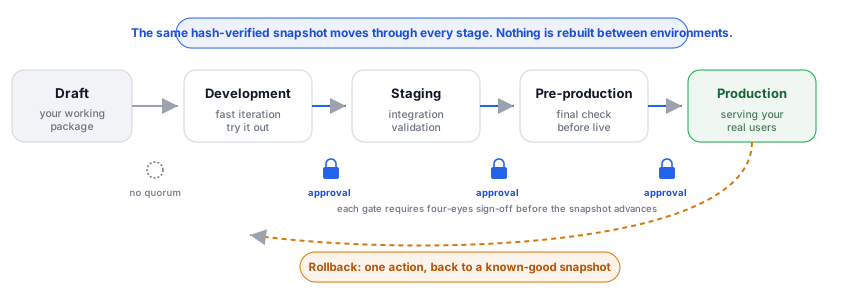
- Approval. A release will be approved for each stage by the people your approval policy names, and the release creator will not be able to approve their own release.
- Deployment in order. A release will deploy to development, staging, pre-production, and production in that order. Pre-production will require an active staging deployment of the release, and production an active pre-production deployment.
- Staged rollout. A production release will reach tenants immediately, by a list of named tenants, by a percentage, or through a schedule of increasing percentages, and a rollout will pause, advance, or cancel on demand.
- Rollback and undeploy. An environment will return to a known-good release in one action, or a release will be removed from an environment.
- Import to draft. A shipped release will load back into the package’s editable draft, so new work starts from exactly what shipped.
Until then, keep your release review in the conversation trail and the compliance check, and treat the release history as the record of what each version contains.
Frequently Asked Questions
When I cut a release, what actually gets captured?
The entire package: screens, entities, workflows, roles and permissions,
pricing and package configuration, AI skills, connector configs, views, app
configs, seed data, and data bundles. It is captured deterministically and
hash-verified. Your customers’ live tenant data is not captured.
How do I see what changed between two versions?
Use the diff view, which compares the two snapshots and lists what was added,
changed, and removed. Version numbers are assigned automatically as
sequential integers, so there is no ambiguity about which is newer.
Can I deploy a release to my tenants today?
Not yet. Approving, deploying, staged rollout, and rollback of releases are
coming soon; see Coming Soon.
Why does my compliance check fail?
Release approval is not available yet, so the approval check fails for every
release. Read the other checks for what the release itself is missing.
Is the audit log truly immutable and tamper-evident?
Yes. It is append-only and hash-chained, and modified, deleted, inserted, or
reordered entries are detectable when the chain is re-walked. No user or
administrator can rewrite history; corrections are new events.
API Reference
Release endpoints are scoped to a SaaS package (:packageId). These
work today:
GET /v1/saas-packages/:packageId/releases: list releases (filter by status).POST /v1/saas-packages/:packageId/releases: create a release snapshot.GET /v1/saas-packages/:packageId/releases/:releaseId: get release details and snapshot contents.GET /v1/saas-packages/:packageId/releases/diff?from=&to=: diff two releases.GET /v1/saas-packages/:packageId/releases/:releaseId/items: list version-pinned manifest items.PATCH /v1/saas-packages/:packageId/releases/:releaseId/status: set release status.POST /v1/saas-packages/:packageId/releases/:releaseId/compliance-check: run the compliance checks.GET/POST /v1/saas-packages/:packageId/releases/:releaseId/comments: list or add review comments.
The deployment, approval, rollout, rollback, and import endpoints appear in the SaaS Builder API reference and become usable when those features are available.
Related reading
- SaaS Packages: the package a release snapshots.
- Binary Distribution & Data Residency: publishing signed desktop and CLI binaries, a separate system from SaaS package releases.
- Roles & Permissions: assign who can cut and review releases.
- Security & Compliance: the platform’s wider posture and attestations.