

The Proof System
Do not ask reviewers to take your mathematics on faith. Backbuild Science includes a UI-based proof system, backed by a small higher-order-logic (HOL) kernel, so the theorems and derivations behind your results are checked from first principles and travel with your paper. This page is written for readers who will interrogate exactly what the kernel checks, what a verified result does and does not guarantee, and how a proof reaches a manuscript.
The HOL kernel and the editor IDE extension are unlocked by either Backbuild Science or Backbuild Prove. Backbuild Science adds the UI-based proof system and proof entries for research, so you build and organize proofs without leaving your project. Backbuild Prove, which adds automatic in-editor diagnostics for source code and signed certificates, is a separate product and is coming soon.
Proof entries
A proof entry is a self-contained, verifiable result inside your research project: a theorem, lemma, or derivation, together with its proof. You build proof entries in the proof system's visual interface and organize them alongside the manuscript they support, so the formal argument and the written argument live in one place. Working with a proof entry has four moves:
- State the result. Capture the claim you want to establish, as a precise formal statement.
- Build the proof. Assemble the steps in the interface, drawing on a large library of pre-verified theorems across many mathematical domains.
- Verify. The proof is checked against the HOL kernel. A result is either established or it is not; there is no partial credit.
- Reference it. Cite the verified result from your manuscript so readers see exactly what has been proven, and what it rests on.
To read a saved proof, open Proofs in the project and choose Documents. Selecting a proof shows a brief opening state, then opens it on its own Backbuild Docs page with the surrounding Backbuild Science tools still available. Steps, narration, and mathematical notation are rendered as formatted WYSIWYG content rather than raw LaTeX. Back returns to the Proofs Documents list, so you can continue through the corpus without leaving the Proofs area.
Exploring and maintaining the proof chain
The Chain view lays the proof dependency tree out from the root at the top, with each level continuing downward. Switch to 3D Viz to explore the same directed tree in three dimensions: branches stay close on one axis when their concepts are similar and on the other when they share citations. You can hide edges, isolate the selected node, and filter by commitment state when a large chain needs a quieter view.
Select a node to open its inspector. The inspector renders the associated prose, mathematical claim, and proof as typeset content, and lists exactly what the node cites, what cites it, and what it consumes. Authors with the required access can change citations, kind, commitment state, and workflow state there, or choose Edit to open the associated content in Backbuild Docs.
A node can also be locked to make the node and its associated proof content read-only for people and tools. Unlocking requires a two-factor check that identifies the specific node being unlocked, and the audit history records the actor and node. Rename and propagate keeps the node's identity while updating its incoming citations and formal proof references, so a rename does not leave stale dependencies behind.
Project proof chains and revalidation
Store each result as its own proof entry, not as one cumulative document containing the entire chain. Backbuild reads the dependencies declared by each entry and uses them to form the project's proof chain. This keeps every definition, lemma, and theorem independently readable in Backbuild Docs while preserving the formal links between them.
- Register parents before children. Backbuild processes proof entries in dependency order. Each entry receives its own kernel verdict, so one rejected proof does not hide the status of the rest of the corpus.
- Invalidate from the changed proof downward. When you replace an entry, Backbuild removes the verified status of that entry and every transitive dependent before checking the replacement. Those descendants cannot continue to rely on the earlier result.
- Recheck the affected chain. When the replacement passes, process the affected downstream proof documents again, following the dependency chain from the changed parent through its children. Backbuild records each proof's new result. If the replacement fails, its dependents remain unverified until the upstream proof is fixed and the chain is checked again.
After an accepted registration, Backbuild saves a signed full kernel snapshot for the project. The snapshot carries the accepted kernel context needed to continue the chain, not just a list of proof names. Backbuild checks the snapshot before reuse. If it is missing, incompatible, or fails its integrity check, the kernel rebuilds the project state by replaying accepted proof entries in dependency order. An upstream replacement removes the prior snapshot before revalidation, so an invalidated descendant can never inherit an outdated verified state.
What the kernel checks, and what it trusts
The single most important thing to understand about any proof assistant is its trusted computing base: the small piece of software whose correctness you are relying on. Backbuild Science is explicit about this.
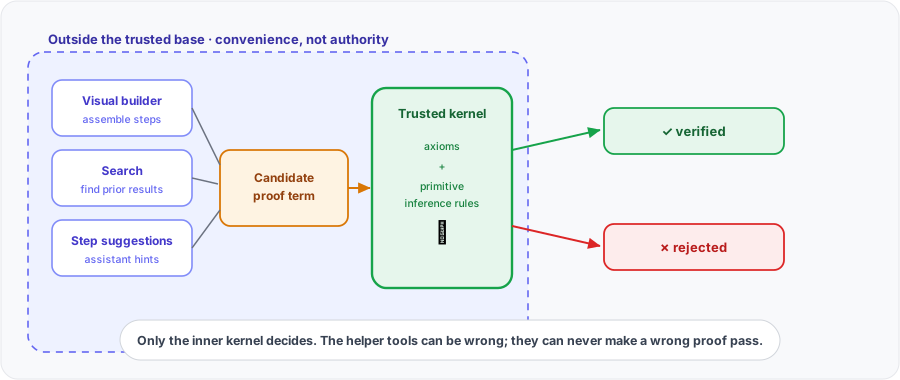
Verification is performed by a higher-order-logic kernel built on a small, auditable foundation: a handful of axioms and primitive inference rules. The kernel's only job is to check that a fully assembled proof term follows from that foundation by legitimate inference alone. Every theorem in the library is derived from the foundation through the kernel, so nothing enters the library without passing the same check.
Everything that helps you build a proof sits outside that trusted core. The visual interface, the search over existing results, and any automation that suggests steps are conveniences that assemble a candidate proof; they are not trusted to decide whether it is correct. The kernel re-checks the finished proof term regardless of how it was produced. This is the standard and deliberate design of a small-kernel system: a bug in the convenience tooling can waste your time, but it cannot make a false statement verify, because the tooling has no authority to accept a proof. Only the small kernel does.
What "verified" actually guarantees
A verified result is a strong guarantee, but it is a precise one, and stating it precisely is part of using the system honestly:
- It guarantees the proof is valid for the statement as written, following from the stated definitions and assumptions by legitimate inference, up to the soundness of the small kernel. There are no unverified gaps and no hand-waving.
- It does not guarantee that your statement is the one you meant. If a definition or hypothesis is written incorrectly, the kernel will faithfully verify the wrong theorem. Verification checks the proof, not your intent, so the statement and definitions still deserve careful human reading.
- It does not import unstated assumptions. Everything the result depends on is part of the formal statement and its cited lemmas, so a reader can see the full set of assumptions rather than trusting an informal "clearly."
In short: a verified result is correct up to its stated definitions and assumptions and the soundness of the kernel. That is exactly the assurance a careful reviewer wants, and it is far stronger than a prose proof sketch.
Proof blocks and whole-document checking in Backbuild Docs
The proof system also reaches into the manuscript itself. Backbuild Docs
treats theorem, lemma, and proof environments as first-class blocks: a
proof block is the document's own
\begin{proof} environment, rendered as a structured
card in the editor, and its mathematical obligation is what the kernel
checks. Beyond checking one block at a time, a
whole-document check walks every theorem-style environment
in the document and returns a verdict for each one from the same
higher-order-logic kernel, so after a revision you can re-check the entire
manuscript in one run: each result is reported as established or rejected,
so an edit that silently breaks a proof elsewhere in the document surfaces
as a rejected obligation on the next check rather than going unnoticed.
Embedding a verified result in your manuscript
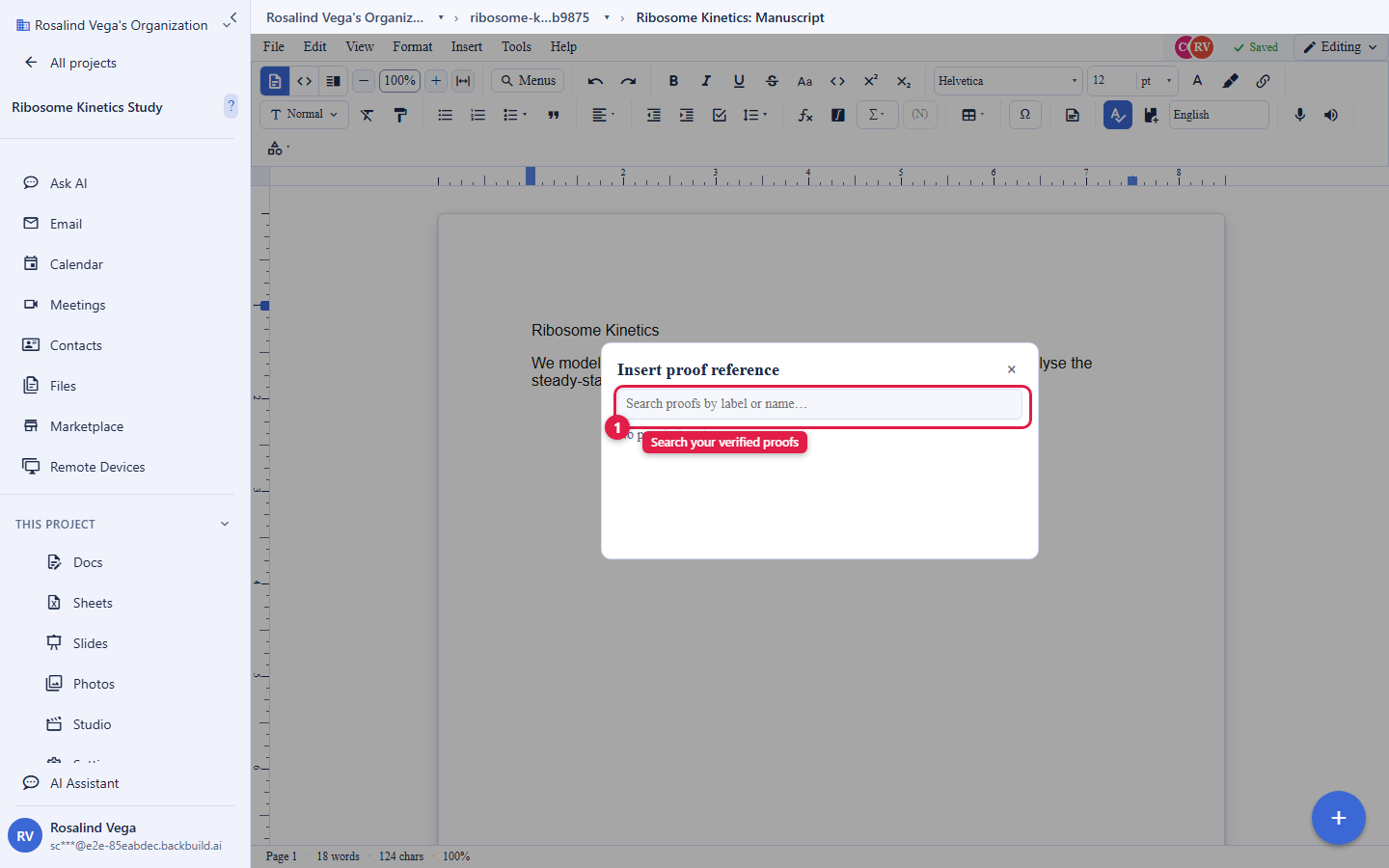
A proof that no one can see does not help a reader. From Backbuild Docs you can insert a proof reference: a live block that embeds an existing, verified proof entry into your manuscript. When you insert one, you pick from the proofs you have access to, and the editor confirms your access at the moment you pick, so a proof reference can only ever point at a result you are allowed to see. The reference stays linked to the proof entry, so the embedded result reflects the verified proof rather than a copied-and-pasted snapshot that can go stale. You can also insert references to a spreadsheet or a slide from the same project the same way, keeping your evidence linked rather than duplicated.
The shared kernel and the IDE extension
The HOL kernel is the same one that powers Backbuild Prove. In Science you use it through the visual proof system to verify the mathematics in your research; in Prove you use it to verify the correctness of source code. Either product on its own unlocks the kernel and the editor IDE extension, so a formal-methods researcher who works partly in an editor and partly in the proof UI has one consistent verification core underneath both.
Building on the Substrate corpus
You rarely start a proof from nothing. Backbuild Science subscribers can clone a read-only Substrate corpus, a large body of pre-verified results, into their own organization to build on. The clone is read-only by design, so the shared foundation stays intact. The moment you try to change something in a read-only clone, the system offers to fork it into your own editable copy, and your edits live in that fork rather than altering the shared corpus. This gives you a stable, verified base to extend while keeping your own work cleanly separated. Access to clone and fork is part of the Science subscription and is enforced per action.
Why it matters for research
Catch errors early
A flawed lemma is caught when you write it, not after a referee finds it, or worse, after publication.
Machine-checked rigor
Verified results give reviewers machine-checked assurance that your derivations hold, with the full set of assumptions visible, rather than a prose sketch.
Reproducible
Proof entries are part of your project. They can be re-checked and can be referenced from the paper, so the formal results travel with the work.
Pairs with your writing
The proof system works hand in hand with the research editors: state and prove a result in the proof system, then reference it from your LaTeX manuscript in Docs. When you export the manuscript and share your project, the verified proofs are part of the same project, so the formal argument and the paper stay together.
Frequently asked questions
- What exactly does the kernel check versus trust?
- The small kernel type-checks the finished proof term against a handful of axioms and primitive inference rules. The visual builder, search, and any step suggestions are outside the trusted base: they assemble a candidate, but only the kernel decides whether it is correct.
- What does "verified" actually guarantee?
- That the proof is valid for the statement as written, following from the stated definitions and assumptions, up to the soundness of the kernel. It does not guarantee your statement says what you intended, so definitions and hypotheses still deserve careful reading.
- Can I put a verified result into my paper?
- Yes. From Backbuild Docs, insert a proof reference to embed a verified proof entry as a live, access-checked block that stays linked to the proof rather than a stale copy.
- What happens when I change a proof near the top of a project chain?
- Backbuild invalidates the changed proof and every transitive dependent before checking the replacement. If the replacement passes, the affected downstream proof documents are checked again and receive fresh verdicts. If it fails, its dependents remain unverified until the upstream proof is fixed.
- Does Backbuild cache a project's verified proof state?
- Yes. After an accepted registration, Backbuild saves a signed full kernel snapshot of the accepted project context. It verifies the snapshot before reuse and rebuilds it from accepted proof entries in dependency order when the snapshot is missing, incompatible, or invalid.
- Is this the same kernel as Backbuild Prove?
- Yes. The same HOL kernel underlies both; Science uses it to verify mathematics through the proof UI, and Prove uses it to verify source code. Either product unlocks the kernel and the IDE extension.
- Do I have to build every theorem from scratch?
- No. You draw on a large library of pre-verified theorems, and you can clone a read-only Substrate corpus into your organization and fork it into an editable copy to extend.